JabberJaw - Theme Documentation
By Progression Studios
Thank you for purchasing this theme. If you have questions that are beyond the scope of this help file, visit our support forum.
Theme Installation
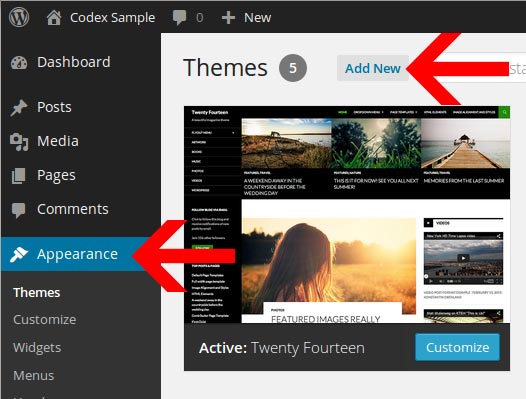
You can install Themes directly to WordPress by using the Add New Themes option in the Appearance sub-menu.
- Log in to the WordPress Administration Panels.
- Select the Appearance panel, then Themes.
- Select Add New.
- Then Select Upload Theme.
- You can then Install your Theme and Activate it.
Adding New Themes Manually (FTP)
To add a new Theme to your WordPress installation, follow these basic steps:
- Download the Theme archive and extract the files it contains. You may need to preserve the directory structure in the archive when extracting these files. Follow the guidelines provided by your Theme author.
- Using an FTP client to access your host web server, create a directory to save your Theme in the wp-content/themes directory provided by WordPress. For example, a Theme named Test should be in wp-content/themes/test. Your Theme may provide this directory as part of the archive.
- Upload the Theme files to the new directory on your host server.
Recommened Plugins
After installing your theme, you will be prompted to install a set if additional plugins. Click on the "Begin Installing Plugins" text link to install the plugins.
You will then view the "Install Required Plugins" page. You can also reach this page under Appearance > Install Plugins. You can select all the items and Bulk Install the plugins or install the plugins one at a time.
Note: We strongly recommend installing theses upon the initial installation. You can also deactivate and remove any plugins later on.
Import Demo Content
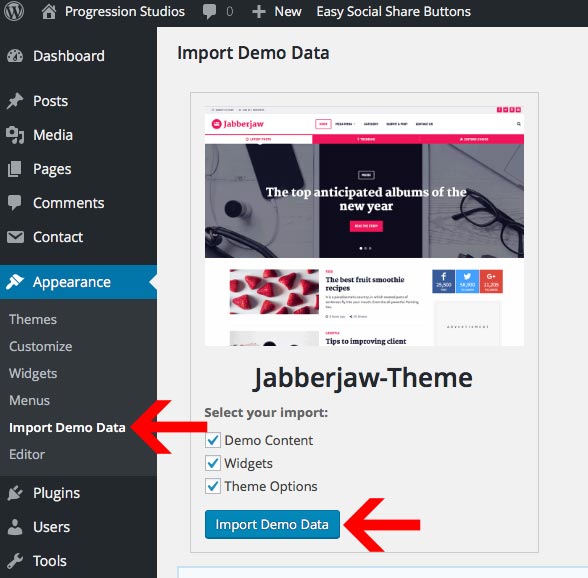
You can import the demo content under Appearance > Import Demo Data. Just click "Import Demo Data" and wait until the importer notifies you the import is completed. Please click import only once and wait, it can take a couple of minutes. If you click import mulitple times it will duplicate the menu items under Appearance > Menus. However the pages themselves will not be duplicated.
Theme Options
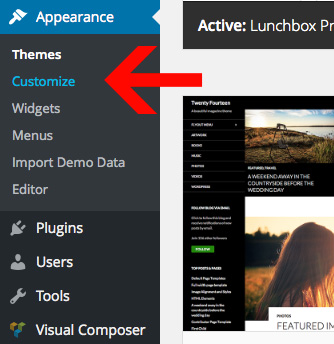
You can easily customize your the theme options under Appearance > Customize.
Changing the Logo
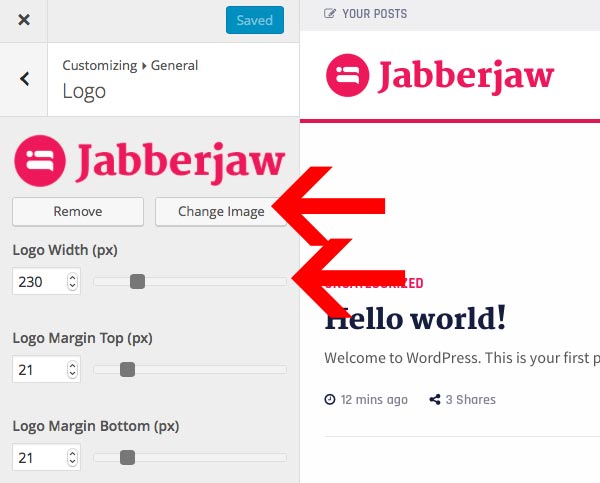
You can easily adjust the logo in the Theme Customizer(Appearance > Customizer) under section "General" and sub-section "Site Logo".
To change your logo, click "Change Image" and choose your new logo. Make sure to adjust the "Logo Width" to match your logo.
Navigation Menu
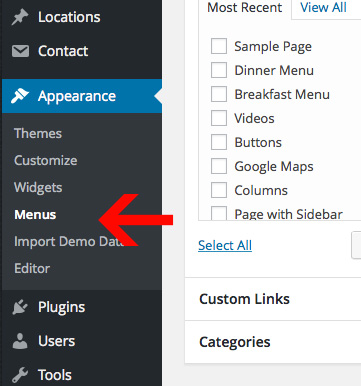
You can create & manage your navigation menus under Appearance > Menus.
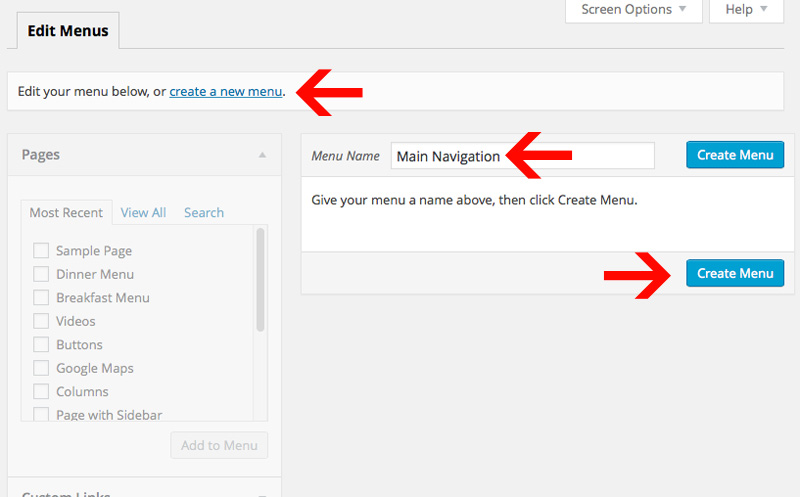
Step 1: Create a Menu
To start, create a new menu. You can click on text link "create a new menu". Then, enter in a menu name and click "Create Menu".
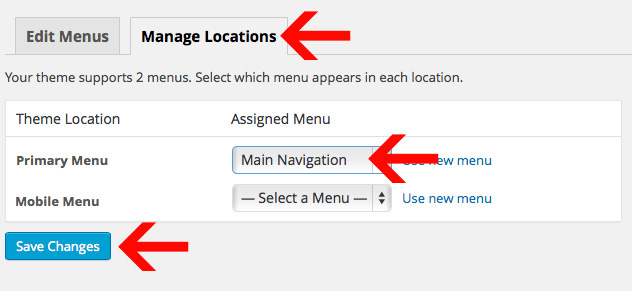
Step 2: Set the Menu Location
After you have created your menu, you need to select the Theme Location. You can do this by going under the "Manage Locations" tab at the top. Then select a menu under "Primary Menu" or "Mobile Menu" and click "Save Changes".
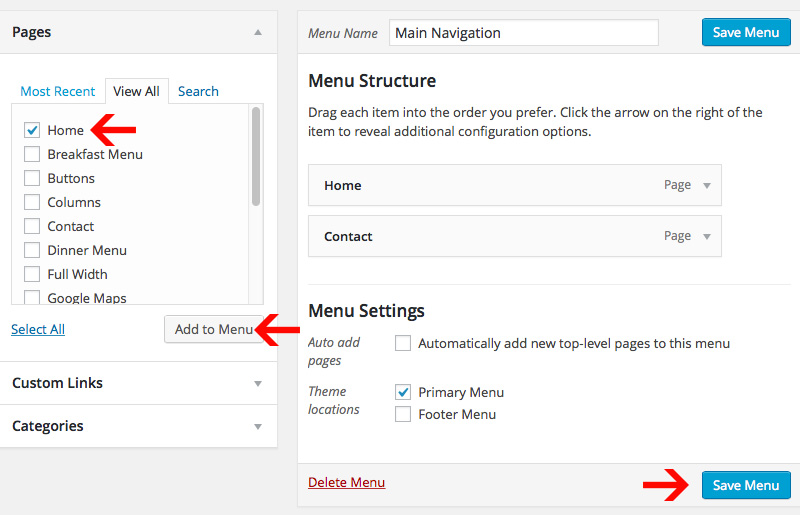
Step 3: Add pages to your Menu
You can then start adding pages and links to your menu. After you click "Add to Menu", it will move the menu item menu on the right. You can drag menu items around to order them. Or customize/delete the menu items by clicking on the down arrow on the right. Make sure to save the menu when you are done editing it.
Adding Sub-menus
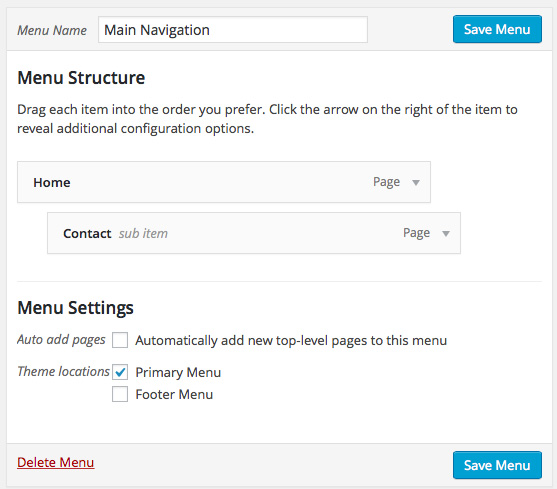
You can make multiple level's of sub-menus. All you need to do is drag the menu item that you want inside the sub-menu under-neath the parent menu item. There will be an option to indent the item, so that the sub-menu item looks like it is pushed inside of the parent menu item. See example, "Contact" is in a sub-menu of the parent page "Home":
Adding Menu Icons
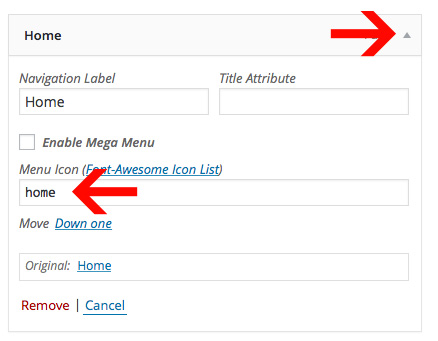
You can easily add-in a menu icon by clicking the small down-arrow and editing the menu item.
You can get a list of avaialble icons here: http://fortawesome.github.io/Font-Awesome/icons/. Just pick an icon and then type in the name of the icon in the "Menu Icon" field.
Adding Mega-Menu's
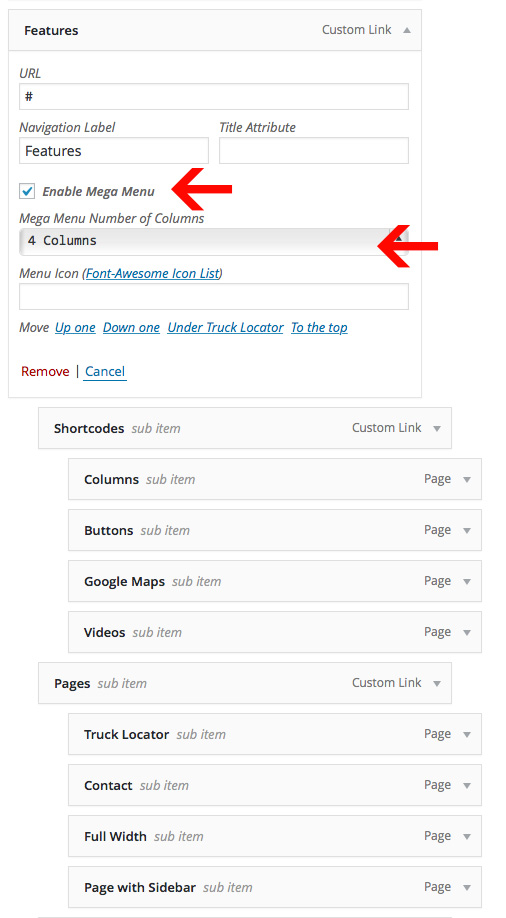
You can easily add-in support for mega-menus by clicking the small down-arrow and editing the menu item. Just click "Enable Mega Menu" and then choose the ammount of columns you want to use for your mega menu.
The first sub-menu level is going to be the heading for the column (Use Custom Link with "#" added in for the URL). The next sub-level will display the navigation item. Here is an screen-shot example of how the live preview menu is setup:
Post Setup
Choosing Editors Choice Posts
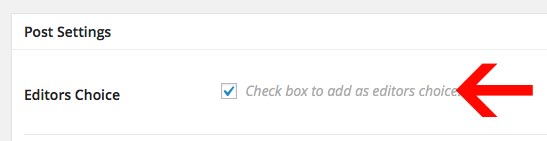
You can add editor's choice posts by selecting the "Editors Choice" field under Post Settings (While editing any post).
Adding an Excerpt (Text on Index)
By default the blog-posts on the blog index will display all content. You can choose custom text on the index by using the excerpt field. By default this field is hidden so you will need to turn it on. You can turn this field on under Screen Opptions in the top right and checking the Excerpt field while editing a post.
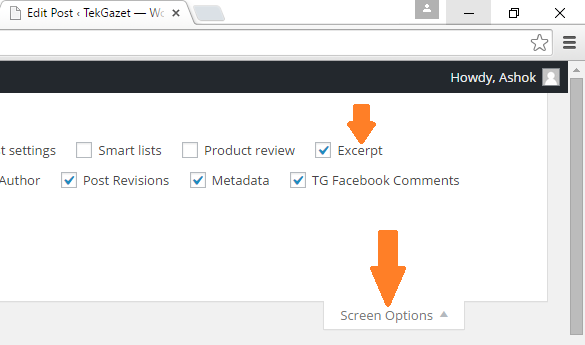
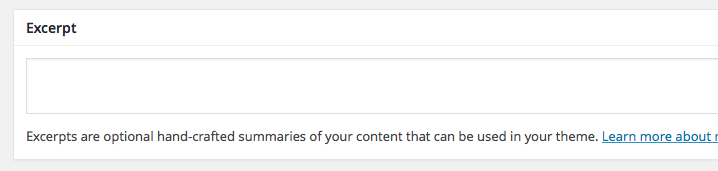
You will then have an excerpt field show up at the bottom of the post editing screen:
Optional 'Continue Reading' Button instead of excerpt
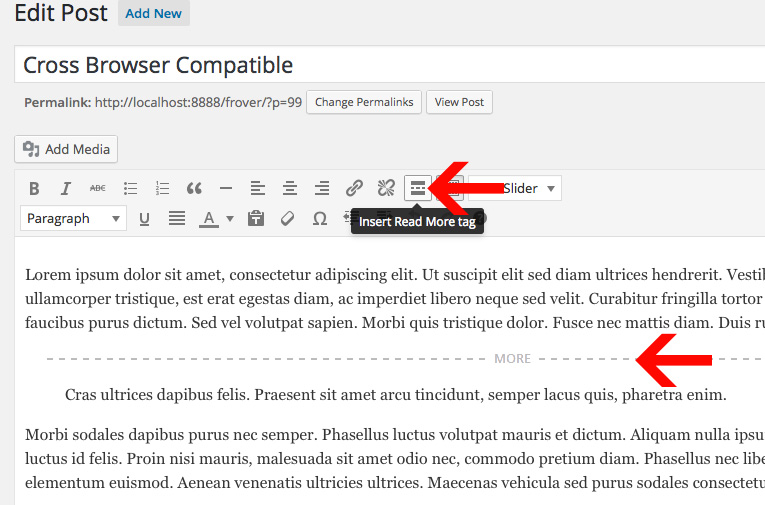
By default the blog-posts on the blog index will display all content. If you want to cut-off the blog-post on the index earlier, you will use the "Insert More" tag. The information above the break will be displayed on the Blog Index and all other information will be displayed on the post page. You can find the button for in default text editor as shown in the example.
Adding a Featured Image
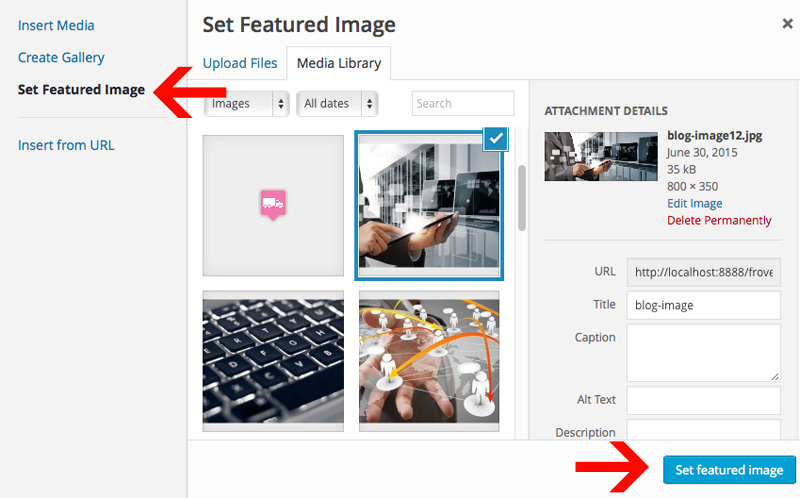
Just click "Add Media" and upload the image. Then click "Set Featured Image" and select your image. The last step is to click "Use as featured image". See the example below.
Adding an Image Gallery
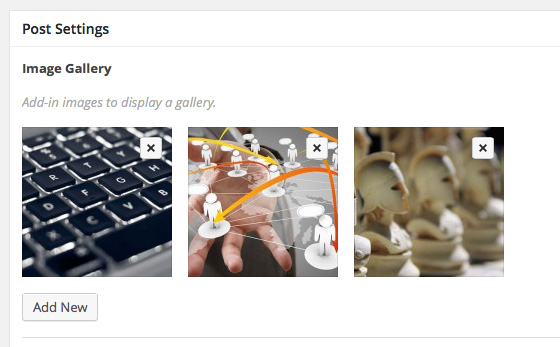
You can add an image gallery by editing the "Post Settings" at the bottom of the post. Just click "Add New" under the Image Gallery and add-in as many images as you need.
Adding Review posts
You can easily add-in star-rating review posts by editing a post and filling out the Review Star Rating field.

Adding audio/video to your Post
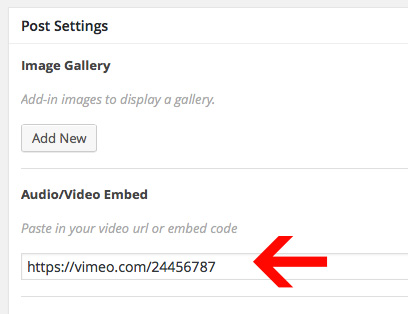
You can add a song or video by editing the "Post Settings" at the bottom of the post. Just copy/paste your URL or embed code into the meta-box flabeled "Audio/Video Embed".
Creating a blog index
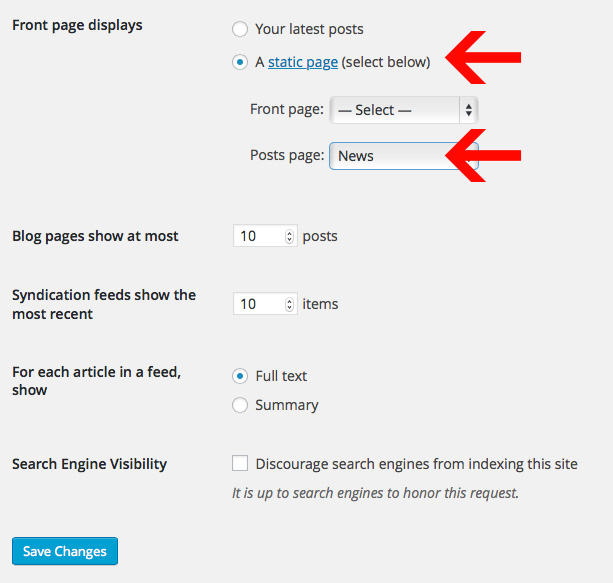
You can create a blog index under. Then you need to need to go to "Settings > Reading".
Then select "A static page" and choose your newly created page under "Posts page".
Frontend Content Form
You can add a frontend content submission to any page using this shortcode:
[progression-studios-front-end-form]
You can customize the fields/text under "Custom Fields" and clicking sync.
Page Builder
This theme is powered by the page builder "Visual Composer". Check out the full Visual Composer documentation here: https://wpbakery.atlassian.net/wiki/display/VC/Learning+More
Using the Page Builder
While editing a page, start by clicking "Classic Mode" or "Frontend Editor". We recommend the Classic mode but both wil work.
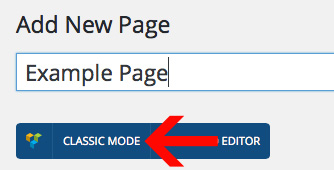
From there you can Add Elements or Templates. The most common one will be Elements (the +). These two buttons are located at the top of the Visual Composer Editor:
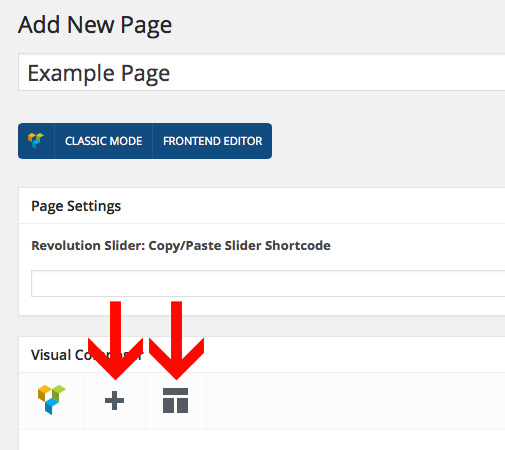
Adding Elements
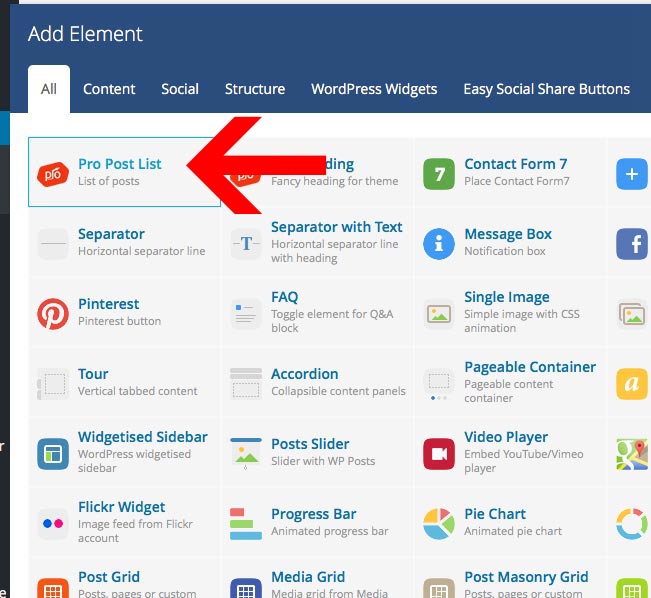
You can add elements by clicking the + icon. From there you get a list of elements. Choose any element and start building. Each element has a bunch of options that you can edit or leave as is:
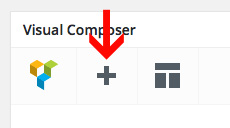
Adding a List of Posts
You can add a list of posts to any page using the Pro Post List element.
The Pro Post list element has many settings. You can choose post counts, pagination, layouts, and even font sizes. Use the tabs at the top to see additional options:
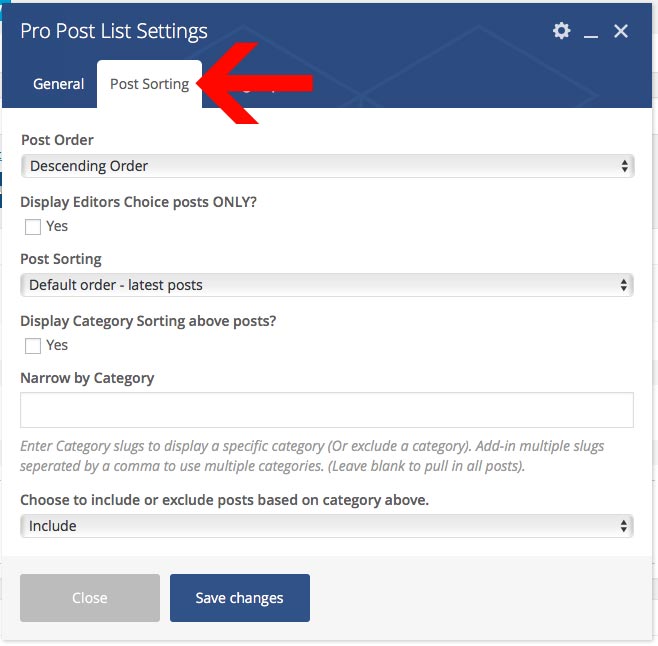
Row Options & Backgrounds
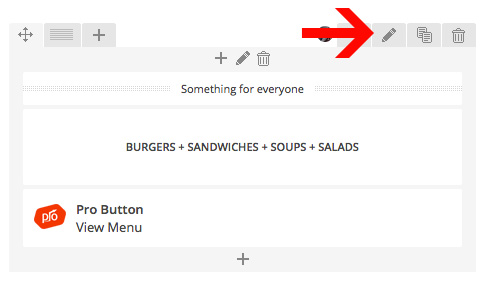
You can edit various rows option by clicking on the "Pencil" icon. This allows you to stretch the rows to full width, add background images, and more.
Adjusting Columns
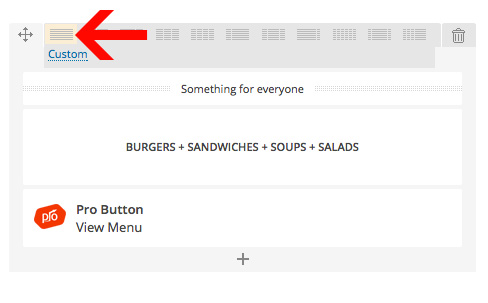
You can easily edit the columns by clicking on the Column icon and adjusting it as needed:
Page Options
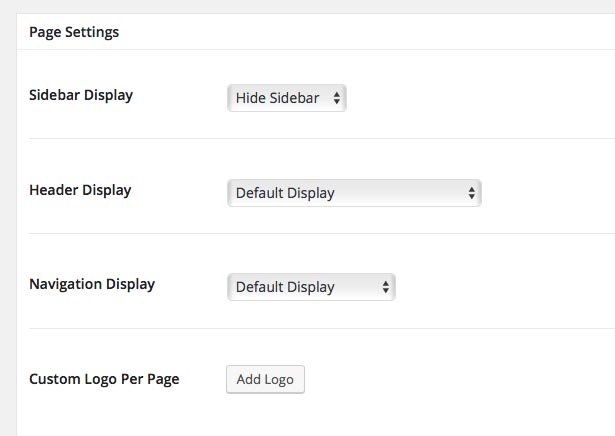
You have additional page options at the bottom which can be used to adjust the sidebar display and header display.
Frontend Content Form
You can add a frontend content submission to any page using this shortcode:
[progression-studios-front-end-form]
You can customize the fields/text under "Custom Fields" and clicking sync.
Login/Registration
Login pages are created automatically when you install the theme. We are using the plugin Theme My Login in order to manage this: https://wordpress.org/plugins/theme-my-login/
Turning Registration On
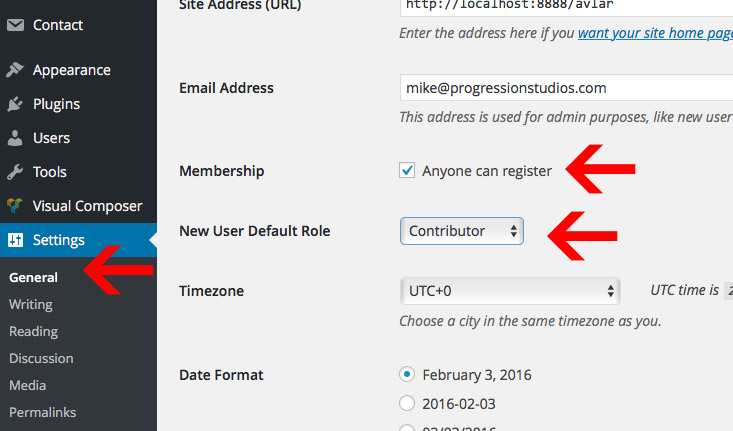
By default site registration is disabled. You can turn this on under "Settings > General" under the heading "Membership". If you want new users to be setup as agents, then make sure the defualt role is set to "Contributor".
Recommended Settings
We recommend adjusting turnign on all the modules under "TML". This gives you greater control over the login/registration for your site.
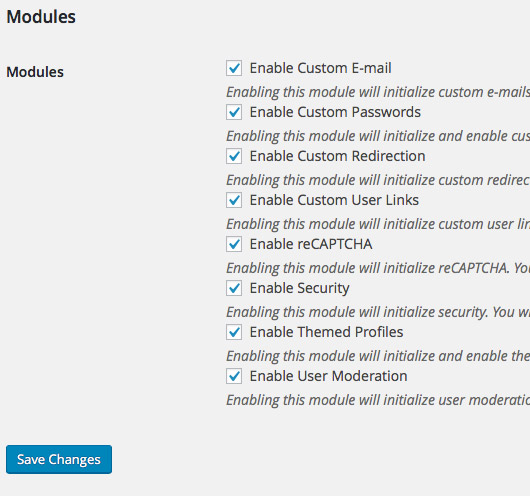
Make sure to edit the "Redirection" section after you turn on the modules. We recommend settings the redicrect for all users to "Referer" although you can adjust this to anything you prefer.
Frontend Content Form
You can add a frontend content submission to any page using this shortcode:
[progression-studios-front-end-form]
You can customize the fields/text under "Custom Fields" and clicking sync.
(Different theme but same directions.)
Slider/Grid Homepage
Selecting Posts for the Slider
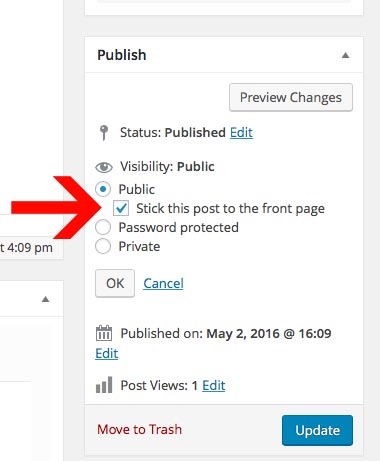
You can choose posts to display in the homepage slider by making them "Sticky Posts". You can mark a post as Sticky Post under the Publish box. Just click Edit and you can select "Stick this post to the front page".
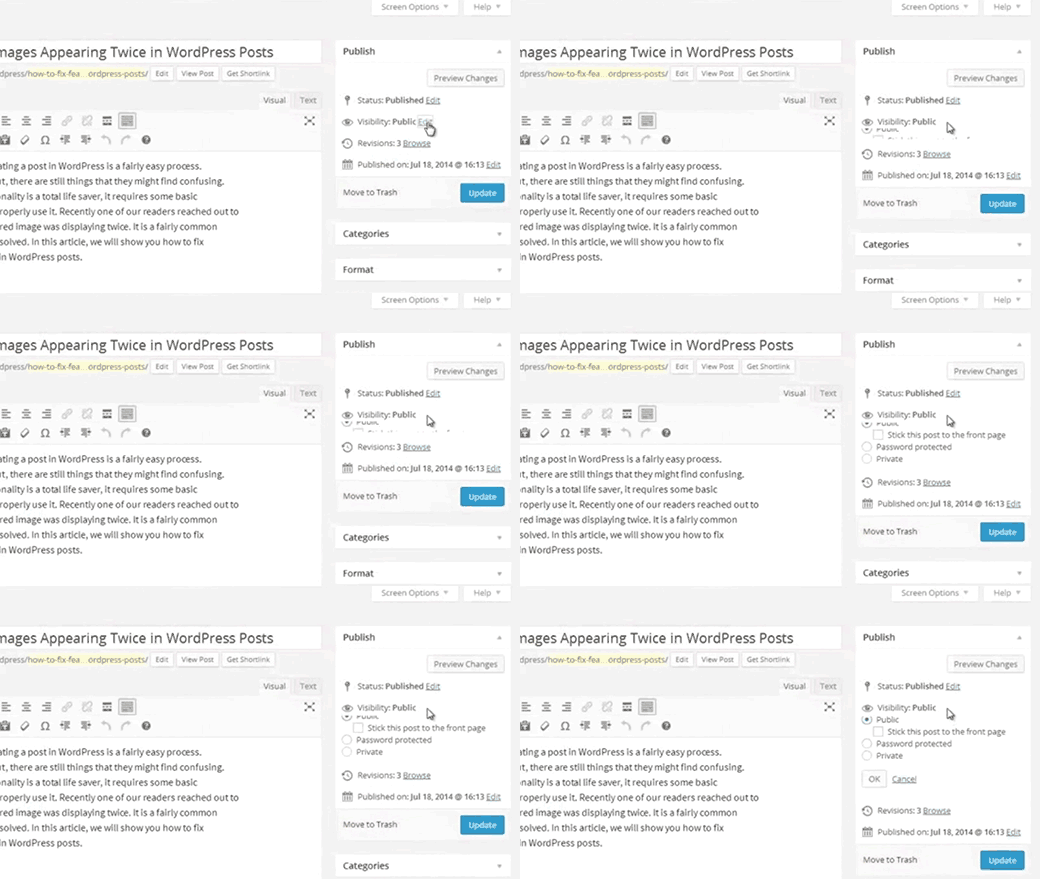
Check the box to make the post Sticky and publish it.
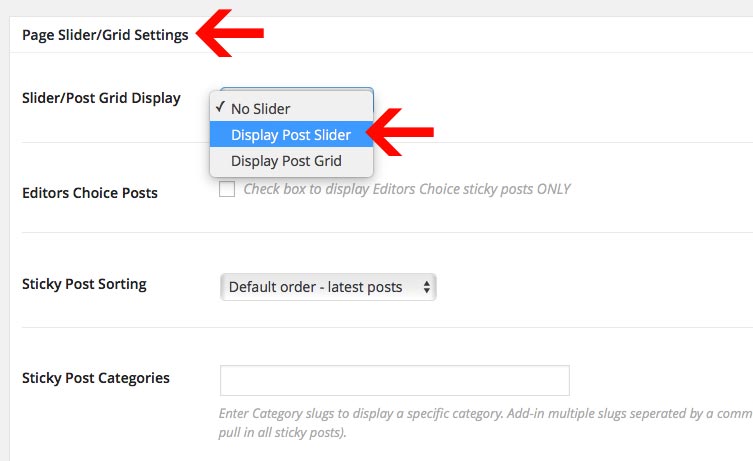
Adding the Slider or Grid to a page
You can add the slider onto any page by editing the page options at the bottom of a page. Just select a slider under "Slider/Post Grid Display"
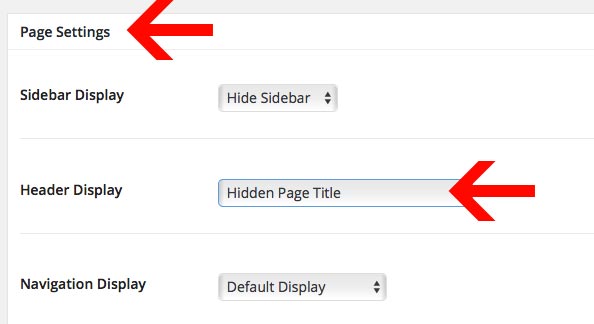
Removing page title
You can remove the page title by editing the Page Settings:
E-mail Newsletter
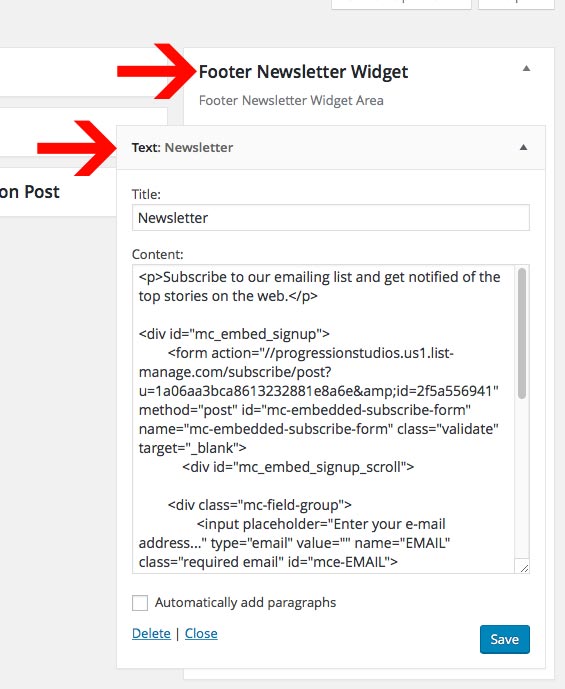
The e-mail newsletter sign-up form in the live preview is powered by "MailChimp". You can learn more about mail-chimp and signup for a free account here: http://mailchimp.com
After regisering for an account, you can add a newsletter sign-up form onto any page or widget area. Note: MailChimp is not required, you can use any third party plugin or service to add-in your newsletter code.
For Mailchimp, you can generate the embed form via these directions: http://kb.mailchimp.com/lists/signup-forms/add-a-signup-form-to-your-website. Make sure to use the "Naked" form without any styles.
You can also instead replace the form action URL with your own. This will ensure your form matches the live previews form.
form action="//progressionstudios.us1.list-manage.com/subscribe/post?u=1a06aa3bca8613232881e8a6e&id=2f5a556941"
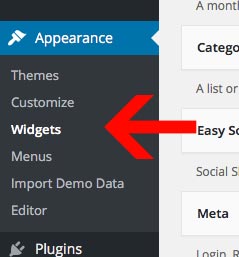
We have a built-in widget area under Appearance > Widgets.
Footer & Sidebar
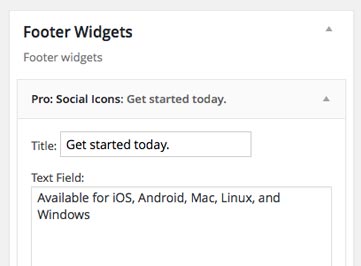
The footers and sidebars are controlled by widgets. You can edit these areas under Appearance > Widgets. Just drag/drop in a widget into the widget area. Here is an example of the Footer Widgets from the live preview:
Copyright Text & Additional Options
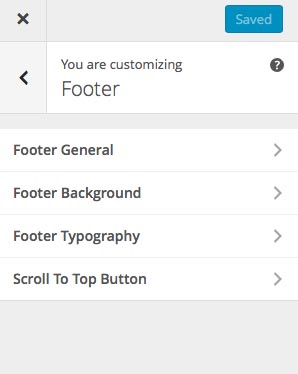
You can edit the footer copyright text under the Theme Options (Appearance > Customize). The footer settings are located under "Footer".
Sidebar
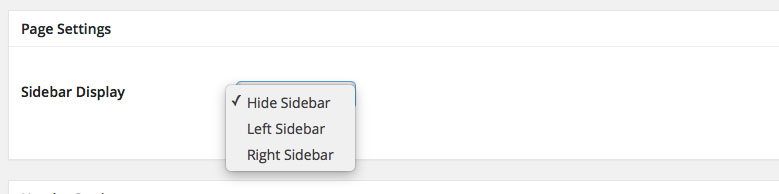
You can turn on the sidebar while editing any page under "Page Settings" at the bottom.
Translating
This theme is ready to be translated to any language. The easiest way to translate is via a Translation WordPress Plugin. Check out wordpress.org for a list of translation plugins. Our current recommendation is the plugin Loco Translate
You can learn more about translating WordPress via the Translating WordPress Documentation.
Need to support Multiple Languages?
Here are some of the Multilingual WordPress Plugins that will allow you to add multiple languages:
- Manage multilingual posts in one post per language (e.g. WPML - paid, xili-language, Polylang or Bogo). Translations are then linked together, indicating that one page is the translation of another.
- Store all languages alternatives for each post in the same post (e.g. qTranslate).
- Manage translations on the generated page instead of using a post context (e.g. Transposh and Global Translator)
- Plugins that direct you to external translation services (e.g. Google AJAX Translation)
- Plugins like Multisite Language Switcher, Multilingual Press, and Zanto, link together separate WordPress network (multisite) installations for each language by pinging back and forth.
Missing Font Characters
If you notice any font characters missing, you will need to select additional Font Subsets. You can manage this under Appearance > Customize under the Typography tab.
Note: Some fonts do not support all font sub-sets. If your font does not support your language, you will need to choose another font that supports your font characters.
Customizations
Any questions regarding customizations of themes are not included in theme support. It is up to the buyer to make any necessary customizations they need. If you would like to hire us for custom development, please contact here: http://progressionstudios.com/contact/
If you have questions that are beyond the scope of this help file, visit our support forum.
Tips on Customizing CSS
If the customization you want to change isn't listed in the Theme Customizer, check the style.css file. We have a table of contents at the top that points out all of the sections within theme. You can also look-up styles using FireBug for FireFox or Safari/Chrome Inspector. This will allow you to edit additional places within the theme.
How to use Firebug for Firefox to look-up styles in the style.css file: https://www.youtube.com/watch?v=6eTW8-C6_gk
How to use Inspector for Safari & Chrome to look-up styles in the style.css file: https://www.youtube.com/watch?v=nOEw9iiopwI
Social Sharing Buttons
The social sharing buttons are added via a premium plugin called Easy Social Sharing Buttons for WordPress. You can adjust all of these options under Easy SociaL Share Buttons.
Full documentation on the Social Sharing plugin can be found here: http://support.creoworx.com/easy-social-share-buttons-version-3-documentation/
You can choose which social networks will display under Social Networks (Also, the order and text).
Importing Social Sharing Setings
You can import the social sharing settings under Easy Social Share Buttons > Import/Export. Copy/paste the Easy Social Settings.txt file from your download into the Import Settings Box. See documentation for more information on this.
The import code is located under your download. Alternatively you can copy/paste it directly from the documetnation below:
{"button_style":"button","style":"6","fullwidth_share_buttons_columns":"1","networks":["facebook","twitter","mail","more","google","linkedin","stumbleupon","pinterest"],"networks_order":["facebook","twitter","mail","more","google","linkedin","stumbleupon","pinterest","digg","del","tumblr","vk","print","flattr","reddit","buffer","love","weibo","pocket","xing","ok","mwp","whatsapp","meneame","blogger","amazon","yahoomail","gmail","aol","newsvine","hackernews","evernote","myspace","mailru","viadeo","line","flipboard","comments","yummly","sms","viber","telegram"],"more_button_func":"1","more_button_icon":"plus","twitter_shareshort_service":"wp","mail_function":"link","whatsapp_shareshort_service":"wp","flattr_lang":"sq_AL","counter_pos":"hidden","force_counters_admin_type":"wp","total_counter_pos":"leftbig","user_network_name_facebook":"Share on Facebook","user_network_name_twitter":"Share on Twitter","user_network_name_google":"-","user_network_name_pinterest":"-","user_network_name_linkedin":"-","user_network_name_digg":"Digg","user_network_name_del":"Del","user_network_name_stumbleupon":"-","user_network_name_tumblr":"Tumblr","user_network_name_vk":"VKontakte","user_network_name_print":"Print","user_network_name_mail":"Share via Email","user_network_name_flattr":"Flattr","user_network_name_reddit":"Reddit","user_network_name_buffer":"Buffer","user_network_name_love":"Love This","user_network_name_weibo":"Weibo","user_network_name_pocket":"Pocket","user_network_name_xing":"Xing","user_network_name_ok":"Odnoklassniki","user_network_name_mwp":"ManageWP.org","user_network_name_more":"More Button","user_network_name_whatsapp":"WhatsApp","user_network_name_meneame":"Meneame","user_network_name_blogger":"Blogger","user_network_name_amazon":"Amazon","user_network_name_yahoomail":"Yahoo Mail","user_network_name_gmail":"Gmail","user_network_name_aol":"AOL","user_network_name_newsvine":"Newsvine","user_network_name_hackernews":"HackerNews","user_network_name_evernote":"Evernote","user_network_name_myspace":"MySpace","user_network_name_mailru":"Mail.ru","user_network_name_viadeo":"Viadeo","user_network_name_line":"Line","user_network_name_flipboard":"Flipboard","user_network_name_comments":"Comments","user_network_name_yummly":"Yummly","ga_tracking_mode":"simple","twitter_card_type":"summary","native_order":["google","twitter","facebook","linkedin","pinterest","youtube","managewp","vk"],"facebook_like_type":"like","google_like_type":"plus","twitter_tweet":"follow","pinterest_native_type":"follow","skin_native_skin":"flat","profiles_button_type":"square","profiles_button_fill":"fill","profiles_button_size":"small","profiles_display_position":"left","profiles_order":["twitter","facebook","google","pinterest","foursquare","yahoo","skype","yelp","feedburner","linkedin","viadeo","xing","myspace","soundcloud","spotify","grooveshark","lastfm","youtube","vimeo","dailymotion","vine","flickr","500px","instagram","wordpress","tumblr","blogger","technorati","reddit","dribbble","stumbleupon","digg","envato","behance","delicious","deviantart","forrst","play","zerply","wikipedia","apple","flattr","github","chimein","friendfeed","newsvine","identica","bebo","zynga","steam","xbox","windows","outlook","coderwall","tripadvisor","appnet","goodreads","tripit","lanyrd","slideshare","buffer","rss","vkontakte","disqus","houzz","mail","patreon","paypal","playstation","smugmug","swarm","triplej","yammer","stackoverflow","drupal","odnoklassniki","android","meetup","persona"],"afterclose_type":"follow","afterclose_like_cols":"onecol","esml_ttl":"1","esml_provider":"sharedcount","esml_access":"manage_options","shorturl_type":"wp","display_in_types":["post","page"],"display_excerpt_pos":"top","topbar_buttons_align":"left","topbar_contentarea_pos":"left","bottombar_buttons_align":"left","bottombar_contentarea_pos":"left","flyin_position":"right","sis_network_order":["facebook","twitter","google","linkedin","pinterest","tumblr","reddit","digg","delicious","vkontakte","odnoklassniki"],"sis_style":"flat-small","sis_align_x":"left","sis_align_y":"top","sis_orientation":"horizontal","mobile_sharebuttonsbar_count":"2","sharebar_counter_pos":"inside","sharebar_total_counter_pos":"before","sharebar_networks_order":["facebook|Facebook","twitter|Twitter","google|Google+","pinterest|Pinterest","linkedin|LinkedIn","digg|Digg","del|Del","stumbleupon|StumbleUpon","tumblr|Tumblr","vk|VKontakte","print|Print","mail|Email","flattr|Flattr","reddit|Reddit","buffer|Buffer","love|Love This","weibo|Weibo","pocket|Pocket","xing|Xing","ok|Odnoklassniki","mwp|ManageWP.org","more|More Button","whatsapp|WhatsApp","meneame|Meneame","blogger|Blogger","amazon|Amazon","yahoomail|Yahoo Mail","gmail|Gmail","aol|AOL","newsvine|Newsvine","hackernews|HackerNews","evernote|Evernote","myspace|MySpace","mailru|Mail.ru","viadeo|Viadeo","line|Line","flipboard|Flipboard","comments|Comments","yummly|Yummly","sms|SMS","viber|Viber","telegram|Telegram"],"sharepoint_counter_pos":"inside","sharepoint_total_counter_pos":"before","sharepoint_networks_order":["facebook|Facebook","twitter|Twitter","google|Google+","pinterest|Pinterest","linkedin|LinkedIn","digg|Digg","del|Del","stumbleupon|StumbleUpon","tumblr|Tumblr","vk|VKontakte","print|Print","mail|Email","flattr|Flattr","reddit|Reddit","buffer|Buffer","love|Love This","weibo|Weibo","pocket|Pocket","xing|Xing","ok|Odnoklassniki","mwp|ManageWP.org","more|More Button","whatsapp|WhatsApp","meneame|Meneame","blogger|Blogger","amazon|Amazon","yahoomail|Yahoo Mail","gmail|Gmail","aol|AOL","newsvine|Newsvine","hackernews|HackerNews","evernote|Evernote","myspace|MySpace","mailru|Mail.ru","viadeo|Viadeo","line|Line","flipboard|Flipboard","comments|Comments","yummly|Yummly","sms|SMS","viber|Viber","telegram|Telegram"],"sharebottom_networks_order":["facebook|Facebook","twitter|Twitter","google|Google+","pinterest|Pinterest","linkedin|LinkedIn","digg|Digg","del|Del","stumbleupon|StumbleUpon","tumblr|Tumblr","vk|VKontakte","print|Print","mail|Email","flattr|Flattr","reddit|Reddit","buffer|Buffer","love|Love This","weibo|Weibo","pocket|Pocket","xing|Xing","ok|Odnoklassniki","mwp|ManageWP.org","more|More Button","whatsapp|WhatsApp","meneame|Meneame","blogger|Blogger","amazon|Amazon","yahoomail|Yahoo Mail","gmail|Gmail","aol|AOL","newsvine|Newsvine","hackernews|HackerNews","evernote|Evernote","myspace|MySpace","mailru|Mail.ru","viadeo|Viadeo","line|Line","flipboard|Flipboard","comments|Comments","yummly|Yummly","sms|SMS","viber|Viber","telegram|Telegram"],"content_position":"content_manual","essb_cache_mode":"full","turnoff_essb_advanced_box":"true","essb_access":"manage_options","apply_clean_buttons_method":"default","mail_subject":"Visit this site %%siteurl%%","mail_body":"Hi, this may be interesting you: %%title%%! This is the link: %%permalink%%","show_counter":"true","facebooktotal":"true","activate_total_counter_text":"shares","fullwidth_align":"left","twitter_message_optimize_method":"1","mail_function_command":"host","mail_function_security":"level1","twitter_counters":"self","cache_counter_refresh":"1","twitter_shareshort":"true","counter_mode":"cached","force_counters_admin":"true","admin_ajax_cache":"true","user_network_name_sms":"SMS","user_network_name_viber":"Viber","user_network_name_telegram":"Telegram","affwp_active_mode":"id","heroshare_second_type":"top","postbar_button_style":"recommended","postbar_counter_pos":"left","mobile_networks_order":["facebook|Facebook","twitter|Twitter","google|Google+","pinterest|Pinterest","linkedin|LinkedIn","digg|Digg","del|Del","stumbleupon|StumbleUpon","tumblr|Tumblr","vk|VKontakte","print|Print","mail|Email","flattr|Flattr","reddit|Reddit","buffer|Buffer","love|Love This","weibo|Weibo","pocket|Pocket","xing|Xing","ok|Odnoklassniki","mwp|ManageWP.org","more|More Button","whatsapp|WhatsApp","meneame|Meneame","blogger|Blogger","amazon|Amazon","yahoomail|Yahoo Mail","gmail|Gmail","aol|AOL","newsvine|Newsvine","hackernews|HackerNews","evernote|Evernote","myspace|MySpace","mailru|Mail.ru","viadeo|Viadeo","line|Line","flipboard|Flipboard","comments|Comments","yummly|Yummly","sms|SMS","viber|Viber","telegram|Telegram"],"fanscounter_active":"true"}Social Settings Default Options built-in to the theme
By default the theme will add-in some default options like the location of the share icons. To change the defaults, edit the options under Appearance > Customize > Blog Settings > Blog Social Sharing Settings.
Adding Social Followers count to widget area
You can easily add-in a follower/fan counter to any widget area. You have to turn this option on under Easy Social Share Buttons > Social Buttons Tab > Social FOllowers Counter
After you choose which social networks you want, you can then add the widget to any area under Apperance > Widgets > Easy Social Share Buttons: Followers Counter